
Command

In Pikmin 4, it is possible to command Oatchi or the rookie Rescue Officer to do something. This allows the player to control one of the two characters manually while the other can make progress on a specific task on their own. The three trekking-related commands – "Come Here", "Go to Base", and "Gather Pikmin" – others can be issued by either character to the other one, while all others can only be exclusively issued to Oatchi. Commands are tied to Oatchi's Command skill, and some of them require the skill to be leveled up via training before they can be used, regardless of which character is ordered.
Using[edit]
During gameplay, the player can open the action menu and choose the left option, "Command". This opens a further menu from which the player can choose what command to issue to the character that is not currently being controlled. Alternatively, the pack menu and the trekking-related commands mentioned above can be bound to  /
/  , allowing the player to press a given direction to immediately open the command menu, or even to immediately issue an order without having to go through any menu.
In Dandori Battles[edit]
In the Dandori Battle mode accessible from the title screen, the command menu's interface works differently, and the only commands available are the trekking-related ones mentioned above. Instead of a large full-screen menu, a smaller menu is imposed on top of the gameplay; this menu does not show the health bars of the leader and Oatchi, does not describe the selected item, and is overall more minimalist. If two human players are playing against one another, opening this menu will not pause the game.
List of commands[edit]

|
This section is a stub. You can help Pikipedia by expanding it. |
| Icon | Name | Requirements | Function | In-game description |
|---|---|---|---|---|
| Pick Up a Scent | Skill level 1 | Makes Oatchi sniff out for any important thing, typically something that is important for story progression. Among the things he can sniff are raw materials, idle Pikmin, the air vent that allows exiting a cave. |
“”
| |
| Castaways | Skill level 1 | Makes Oatchi locate any castaways nearby. |
“”
| |
| Leaflings | Skill level 1, at least one leafling found before | Makes Oatchi locate any leaflings nearby. |
“”
| |
| Olimar | Skill level 1 | Makes Oatchi locate Olimar. |
“”
| |
| This Leafling | Skill level 1 | Makes Oatchi locate the red leafling often found in Dandori Battle caves. |
“”
| |
| Louie | Skill level 1 | Makes Oatchi locate Louie. |
“”
| |
| Treasure | Skill level 1 | Makes Oatchi locate nearby treasure. |
“”
| |
| Onions | Skill level 1 | Makes Oatchi locate nearby Onions or Flarlic. |
“”
| |
| Raw Materials | Skill level 1 | Makes Oatchi locate nearby raw materials. |
“”
| |
| (Type) Pikmin | Skill level 1, the specified Pikmin type must not have an Onion | Makes Oatchi locate Pikmin of the specified type and bring them to the Rescue Officer. |
“”
| |
| Defend Lumiknoll | Skill level 1 | Makes Oatchi circle the Lumiknoll and attack enemies that approach it. In night expeditions with two Lumiknolls, each one has their own option. |
“”
| |
| Come Here | Skill level 2 | Makes Oatchi or the Rescue Officer come to the character the player is currently controlling. |
“”
| |
| Go to Base | Skill level 2 | Makes Oatchi or the Rescue Officer go towards the current base. |
“”
| |
| Gather Pikmin | Skill level 3 | Makes Oatchi or the Rescue Officer find any stray Pikmin not performing tasks and bring them to the character the player is controlling. |
“”
|
Gallery[edit]
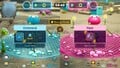 The command menu in the Dandori Battle mode of the title screen.
