
Dandori Battle menu
| Dandori Battle menu | |
|---|---|
| |
| Accessed from | Title screen |
| Provides access to | Dandori Battle gameplay |
| Music | Dandori Preparation |


The Dandori Battle menu is the menu on Pikmin 4's title screen, serving as the connection between the menu and Dandori Battle mode. This menu lets the player pick what stage to play, as well as the setting for each stage. There are three settings to choose from.
Select stage screen[edit]
This screen is the first screen shown to the player when they access Dandori Battle mode. This screen is where the player can choose what stage to play. There are a total of 6 stages, which are the same stages as the ones played during Story Mode. Each stage has its own little description underneath, and to unlock a new stage, the previous one must be played – similar to Bingo Battle.

At the top of the screen is the score of the 2 players, with an image of each leader on either side. At the bottom of the screen lies multiple button prompts. From left-to-right, there is:  Options,
  Gameplay Guide,
  Change Players,
  Select Randomly,
  Close, and
  Confirm. The Select Randomly button prompt will only appear once at least 2 stages have been unlocked.
The Options button leads to the Options menu and the Gameplay Guide button opens the Gameplay Guide. The Change Players button lets the player change whether it is one player vs. a CPU, one player vs. another, or two players vs. a CPU. The Select Randomly button randomly chooses an unlocked stage. The Close button takes the player back to the title screen, and the Confirm button takes the player to the Rule selection screen.
Rule selection screen[edit]
After the stage selection screen, there are four main buttons. There is the Start Battle button, Player Settings button, Battle Setting button, and Difficulty button. The Start Battle button takes the player directly into gameplay, whereas the other 3 buttons let the player alter a few settings.
In the middle of the screen, there will be 3 boxes. The left and right boxes contain the setting chosen for player 1 and player 2 (or the CPU). This includes squad size, how many Mystery Capsules each player start with, whether the Charging Horn is on, and Oatchi's / Moss' Buff level. The central box contains setting pertaining to both players. This includes the Pikmin type, and whether Bonus Finds, Mystery Capsules and Sneak Bombs will spawn. There are only two button prompts on the bottom of the screen, those being Back and Confirm. The Back button takes the player back to the stage selection screen, and the Confirm button lets the player press
Player Settings[edit]
This mini-menu lets the player choose who they play as. For player 1, they will have access to their custom character in each save file, as well as Shepherd and Collin. Player 2 will have access to Olimar and Louie, though Louie will only be selectable once he has been battled in Story Mode. If this mode is played before the player has created any character, only Shepherd and Collin will be available for player 1.
Battle Settings[edit]
This mini-menu is linked with the central box on the rule selection screen. The player can choose what type of Pikmin is in play, with the default one being the one present in the Story Mode cave. All 8 Pikmin will be selectable. The player is also able to toggle whether Bonus Finds, Mystery Capsules, and Sneaky Bombs can spawn. They will all be toggled on by default.
Difficulty[edit]
This final mini-menu is linked with the left and right boxes on the rule selection screen. Players can choose what difficulty to play on, with there being 5 to choose from.
- Super Sweet: this difficulty gives the player 50 Pikmin, 5 starting Mystery Capsules, access to the Charging Horn, and their pup will have the Swallow skill.
- Kinda Sweet: this difficulty gives the player 25 Pikmin, 2 starting Mystery Capsules, access to the Charging Horn, and their pup will have the Super Buff skill at level 2.
- Normal: this difficulty is the default difficulty, and it gives the player 10 Pikmin, access to the Charging Horn, 0 starting Mystery Capsules, and their pup will have the Super Buff skill at level 1.
- Kinda Spicy: this difficulty gives the player 5 Pikmin, 0 starting Mystery Capsules, access to the Charging Horn, and their pup will have the Buff skill at level 3.
- Ultra Spicy: this difficulty gives the player 1 Pikmin, 0 starting Mystery Capsules, no access to the Charging Horn, and their pup will have the Buff skill at level 2.
 The Player Settings menu.
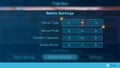 The Battle Settings menu.
 The Difficulty menu.


